Related reading:
- What is Database Change Management? (this article)
- Top Database Change Management Tools
- State-based vs. Change-based Database Version Control
- Database Version Control Best Practice
- The 6 Levels of Database Automation
Definition
Database Change Management (DCM) is the discipline of proposing, reviewing, deploying, and auditing every change that touches a database — both structure and data — the same way code changes flow through version control and CI/CD.
For relational databases, SQL is the medium. Changes fall into three categories:
- DDL (Data Definition Language) — schema:
CREATE,ALTER,DROP. - DML (Data Manipulation Language) — data:
INSERT,UPDATE,DELETE. - DCL (Data Control Language) — permissions:
GRANT,REVOKE.
Most DCM tools focus on DDL. Mature DCM covers all three — because the outage risk, data risk, and compliance risk each live in a different category, and you can't manage one without touching the others.
In practice, those changes don't come from one place. Application servers, cron jobs, ad-hoc scripts, and humans on the CLI all converge on the same database:
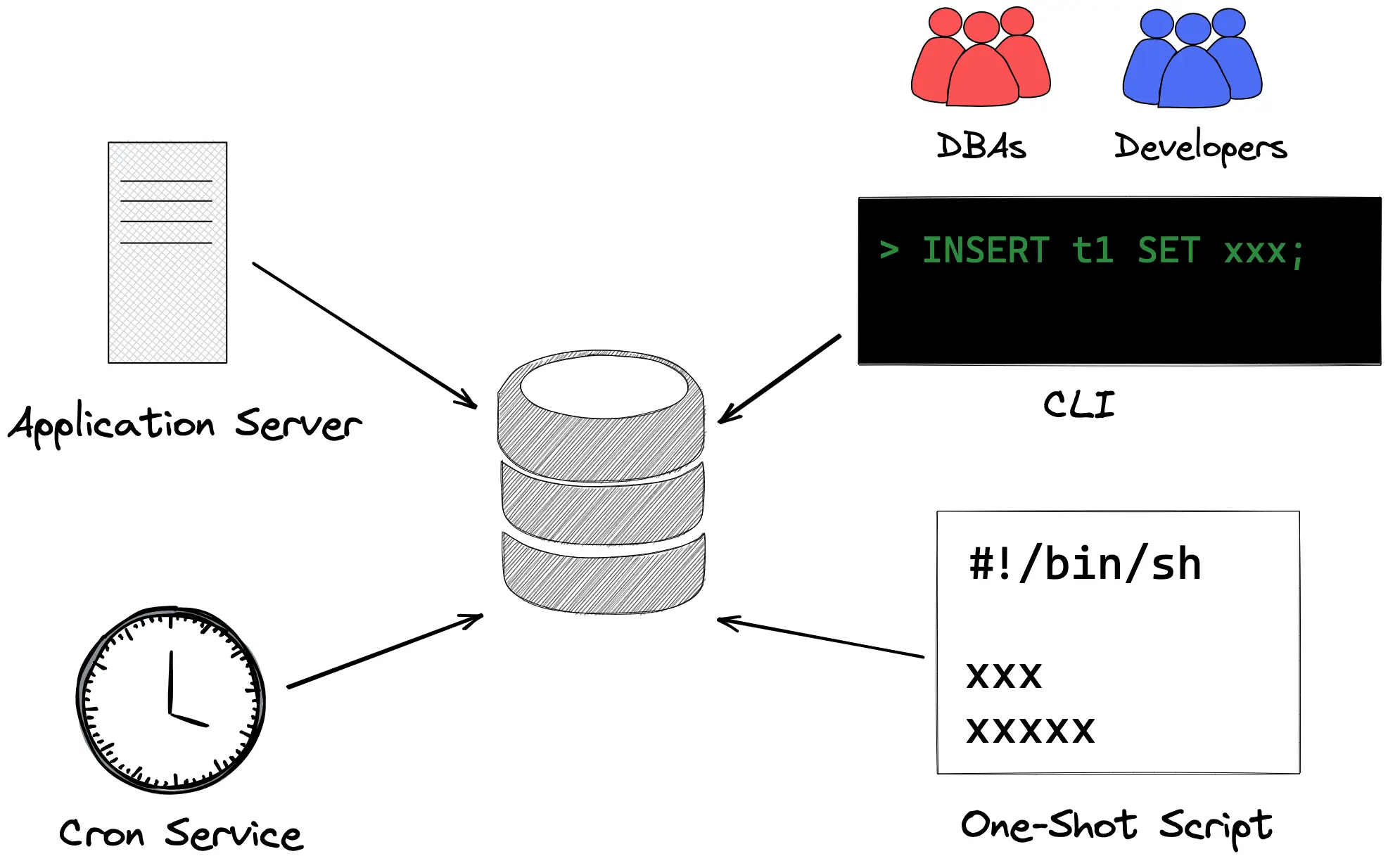
That's what DCM has to wrangle.
Why It's Hard
Writing a migration is easy. Shipping it safely across a team, across environments, across time is hard. The recurring failure modes:
1. Uncoordinated changes
Two developers rename the same column in different branches. A DBA adds an index in production directly. An application deploys a migration while another service is mid-read.
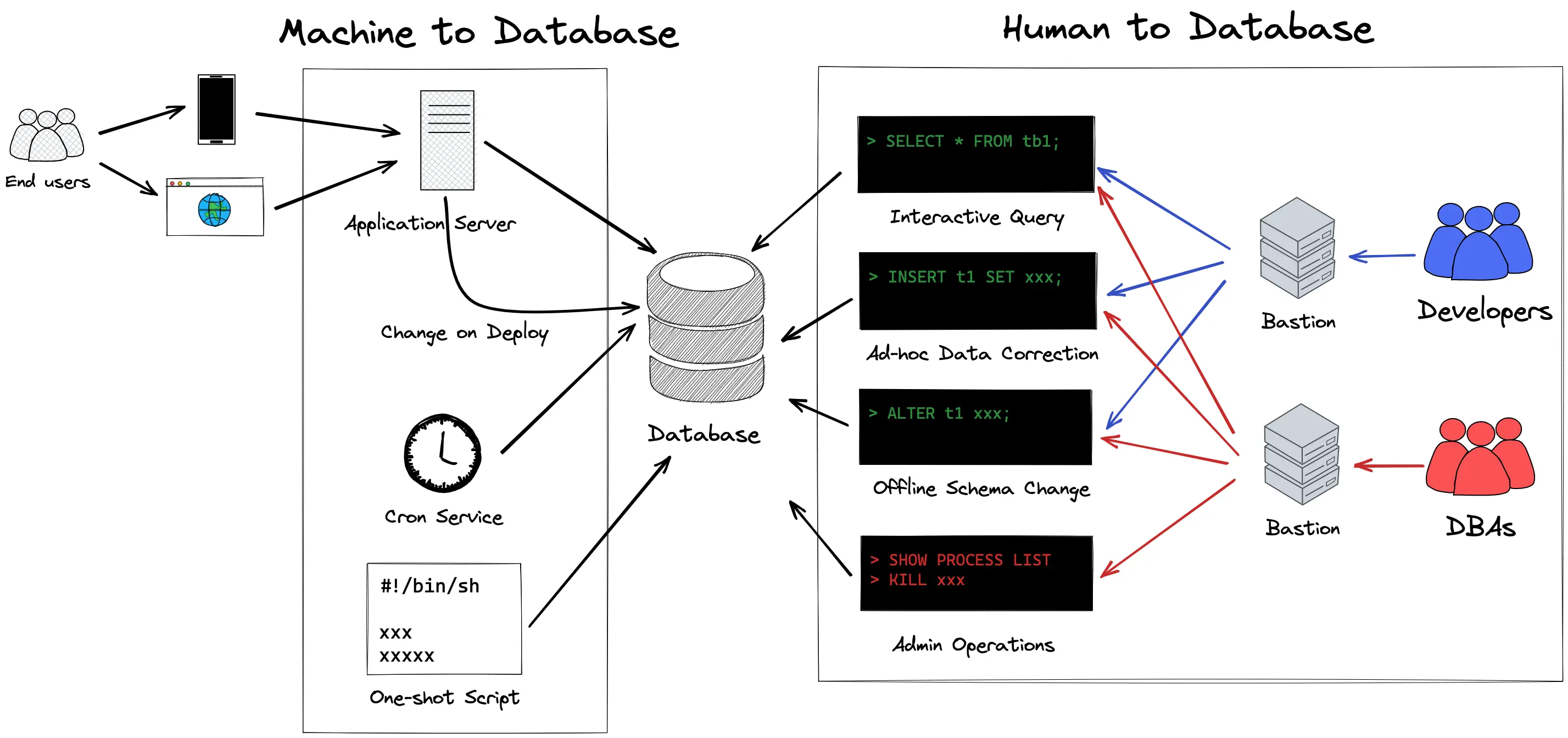
Without a single place where every change is proposed and serialized, you get schema conflicts, lost changes, and outages.
2. Environment drift
Dev, staging, and production drift apart. A column exists in dev but not in prod. A constraint is active in staging but disabled in prod because "it was slow." The next migration assumes a shape that only exists in one environment, and the deployment to the other two breaks.
3. Irreversible mistakes in production
DROP TABLE ran against the wrong database. A DELETE without a WHERE clause landed before anyone caught it. A migration locked a 50M-row table for 20 minutes during peak traffic. Each of these is a specific failure with a specific prevention — but only if changes go through review before they reach production.
4. Compliance and audit gaps
A SOC 2 auditor asks: "Who approved the schema change that touched the PII table on March 14, and what was the SQL?" If the answer lives in Slack screenshots, Jira tickets, and a DBA's memory, you have a problem. Audit trails need to be automatic, tamper-evident, and queryable.
5. Rollback complexity
Most DDL is not cleanly reversible — DROP COLUMN loses the data; ALTER TABLE doesn't have a built-in undo. A change made in a hurry without a rollback plan becomes a recovery project. DML changes are worse because you have to reconstruct state, not just schema.
6. Access sprawl
The root credential is in five config files. Seven developers have direct prod access "for emergencies." No one knows who ran the last hand-typed UPDATE. Access control and query control need to be part of DCM, not a separate track.
The Ideal Workflow
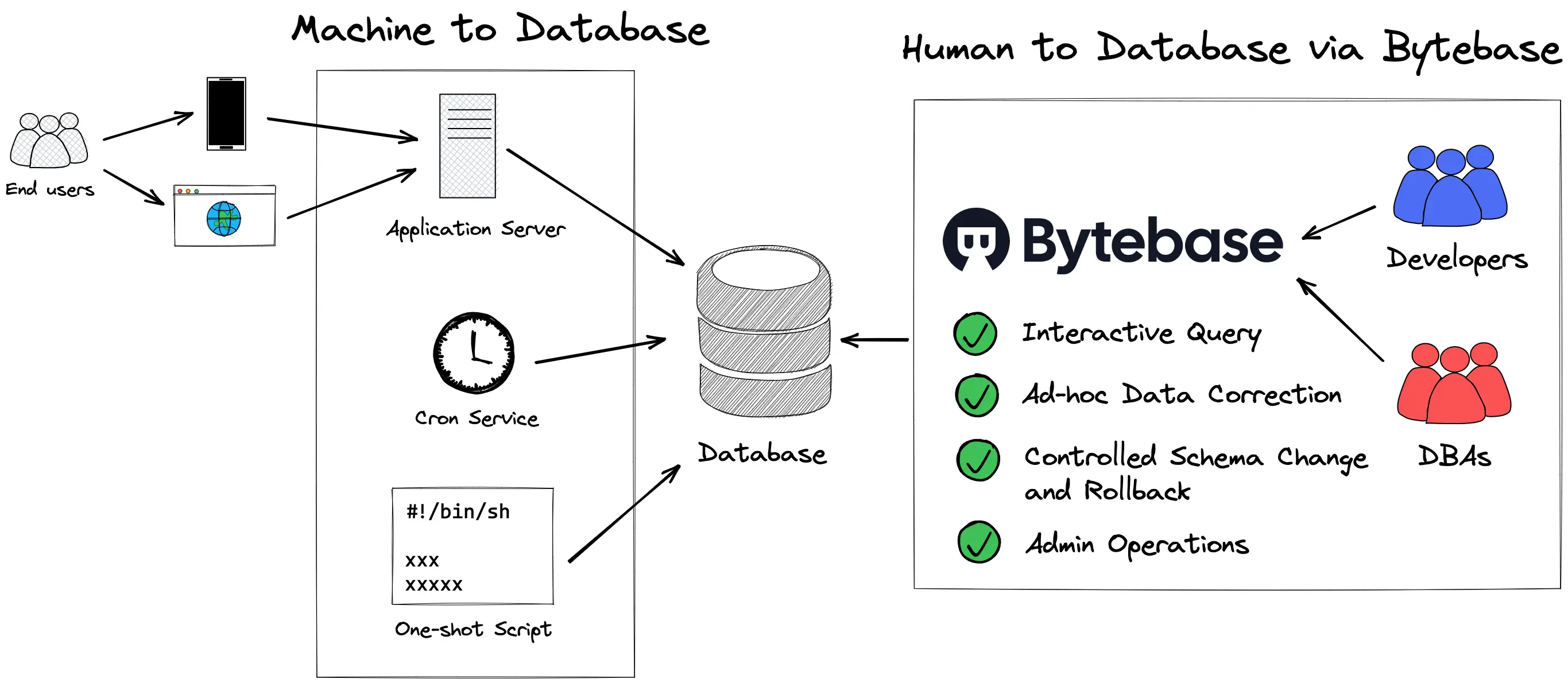
Modern DCM treats database changes like code changes:
-
Propose — a developer writes the SQL (or generates it from a schema definition) and submits it as a change request — the database equivalent of a pull request.
-
Automated review — the system lints the SQL against a rule set: naming conventions, destructive operations without backups, missing indexes,
UPDATEwithoutWHERE, etc. Modern SQL review engines carry 200+ rules and catch the common mistakes before a human looks at the change. -
Human review — a DBA or platform engineer reviews the intent, the business impact, and anything the linter can't catch (e.g., "does this migration preserve the invariant the finance team depends on?").
-
Approval — depending on risk, the change routes through a custom approval flow — e.g., DDL on prod requires DBA + manager sign-off; DML touching PII requires security review.
-
Staged rollout — the change deploys through environments in order: dev → staging → prod. Each stage is a checkpoint. Cross-database or cross-tenant rollouts run as a single batch with canary support.
-
Audit — every action — who proposed, who approved, what SQL ran, when, against which database — is recorded immutably. The audit log is the answer to every compliance question.
-
Rollback plan — for any change beyond trivial, the rollback SQL is written and stored alongside the forward migration.
State-based vs. Change-based
Two philosophies for how changes are expressed:
Change-based (imperative) — you write the migration SQL yourself: ALTER TABLE orders ADD COLUMN status VARCHAR(20);. Each change is a numbered, ordered file. Flyway, Liquibase, and Bytebase's default workflow use this model.
State-based (declarative) — you define what the schema should look like, and the tool computes the diff and generates the migration automatically. Atlas, Schemachange, and Bytebase's state-based workflow for PostgreSQL use this model.
| Change-based | State-based | |
|---|---|---|
| Source of truth | Ordered migration files | Desired schema (HCL, SQL, ORM) |
| Data migrations | Natural fit — you write the SQL | Awkward — declarative models describe shape, not data movement |
| Review diff | The migration file itself | Tool-generated SQL (must be reviewed before apply) |
| Drift detection | Hard — requires reconciling applied migrations with live schema | Built in — diff against desired state |
| Rollback | Explicit DOWN migrations (if you wrote them) | Re-apply previous state |
Most real teams run a hybrid — state-based for greenfield schema work, change-based for data migrations, conditional backfills, and anything stateful.
How to Evaluate a DCM Tool
The market has many tools — desktop clients with migration features, CLI migration engines, full platforms. When picking one, look at:
-
SQL review depth — how many rules, how configurable per environment, engine-specific coverage. A tool that catches "missing index on a foreign key" saves more incidents than one that only lints syntax.
-
Approval flow flexibility — can you define rules like "DDL on prod requires DBA approval, DML touching PII requires security approval"? Or is it just "one approver clicks yes"?
-
Multi-environment and multi-tenant rollout — can a single change deploy across dev → staging → prod with gates? Across 500 tenant databases with canary?
-
GitOps integration — does committing SQL to Git automatically create a reviewable change? Does the SQL review result show up in the PR?
-
Access control and data masking — DCM that ignores DCL is only doing half the job. Can it enforce role-based access, dynamic data masking, and just-in-time data access?
-
Audit log — is every action recorded with user, time, SQL, and target? Is it queryable and exportable?
-
Rollback support — can the tool store and execute rollback SQL? Can it detect and flag schema changes made outside the tool?
-
Engine coverage — not just "does it connect" but "does it understand engine-specific syntax and best practices" (e.g., MySQL online DDL, PostgreSQL
CONCURRENTLY, Oracle invisible indexes). -
Deployment model — self-hosted for air-gapped environments? Cloud for fast onboarding? Both?
-
Developer experience — GUI for DBAs, CLI/API for automation, IDE integration for developers. The tool gets used more when friction is low.
For a broader breakdown, see Top Database Change Management Tools.
DCM and DevOps
Classical DevOps moved application deployment from ticket-driven ops to code-driven pipelines. DCM does the same for databases. The 6 levels of database automation are the maturity ladder:
- Level 0 — SSH into prod, run SQL by hand.
- Level 1 — SQL files in Git, but applied manually.
- Level 2 — migration tool runs on deploy, no review.
- Level 3 — changes go through review + approval before deploy.
- Level 4 — full platform: review, approval, GitOps, multi-env rollout, audit, access control, masking.
- Level 5 — autonomous operation with policy-as-code, drift detection, and automatic remediation.
Most teams sit at Level 2. The gap from Level 2 to Level 4 is where DCM earns its keep — that's where outages stop happening on Fridays and auditors stop asking uncomfortable questions.
How Bytebase Approaches DCM
Bytebase is a database DevSecOps platform built around this workflow:
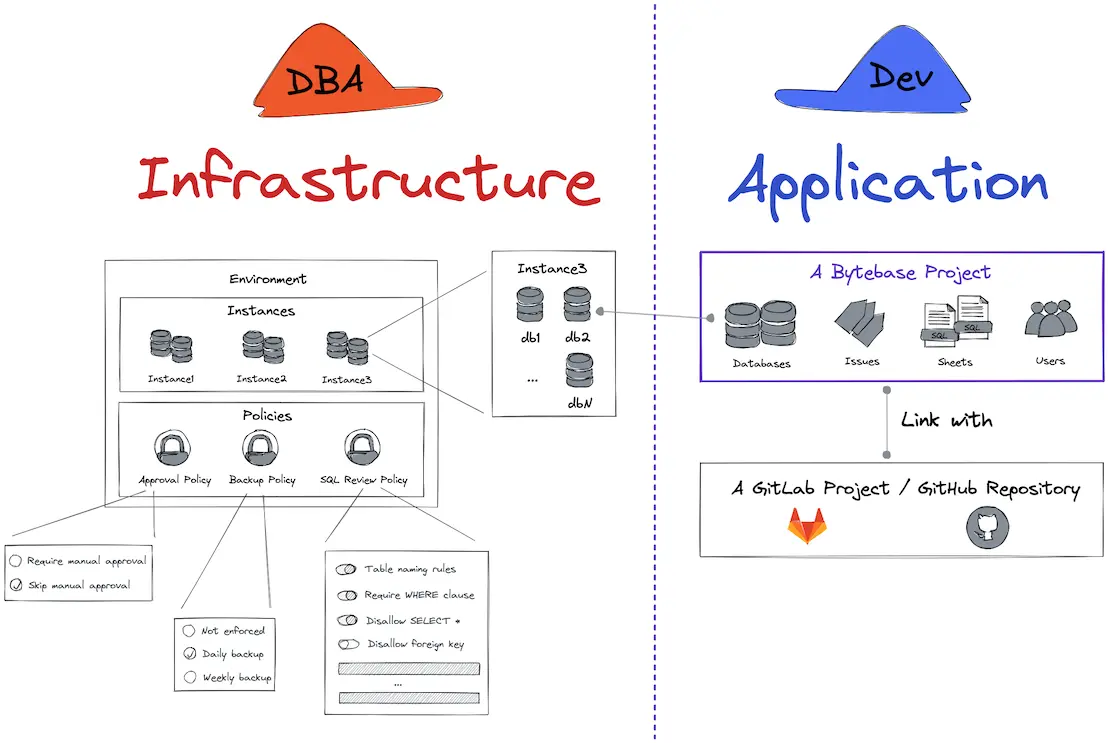
- Change as issue — every DDL/DML change is proposed as an issue (the database equivalent of a PR).
- SQL review — 200+ engine-specific rules, configurable per environment.
- Custom approval flow — route changes through rules based on environment, change type, or data sensitivity.
- Multi-environment rollout — single issue, staged deployment across dev → staging → prod.
- GitOps — GitHub, GitLab, Bitbucket, Azure DevOps — SQL files in Git become reviewable change issues.
- Access control + data masking — workspace/project roles, column-level dynamic masking, just-in-time access.
- Audit log — every action, every user, every target, queryable and exportable.
- 23 engines — 9 RDBMS, 6 NoSQL, 7 data warehouses, plus Elasticsearch.
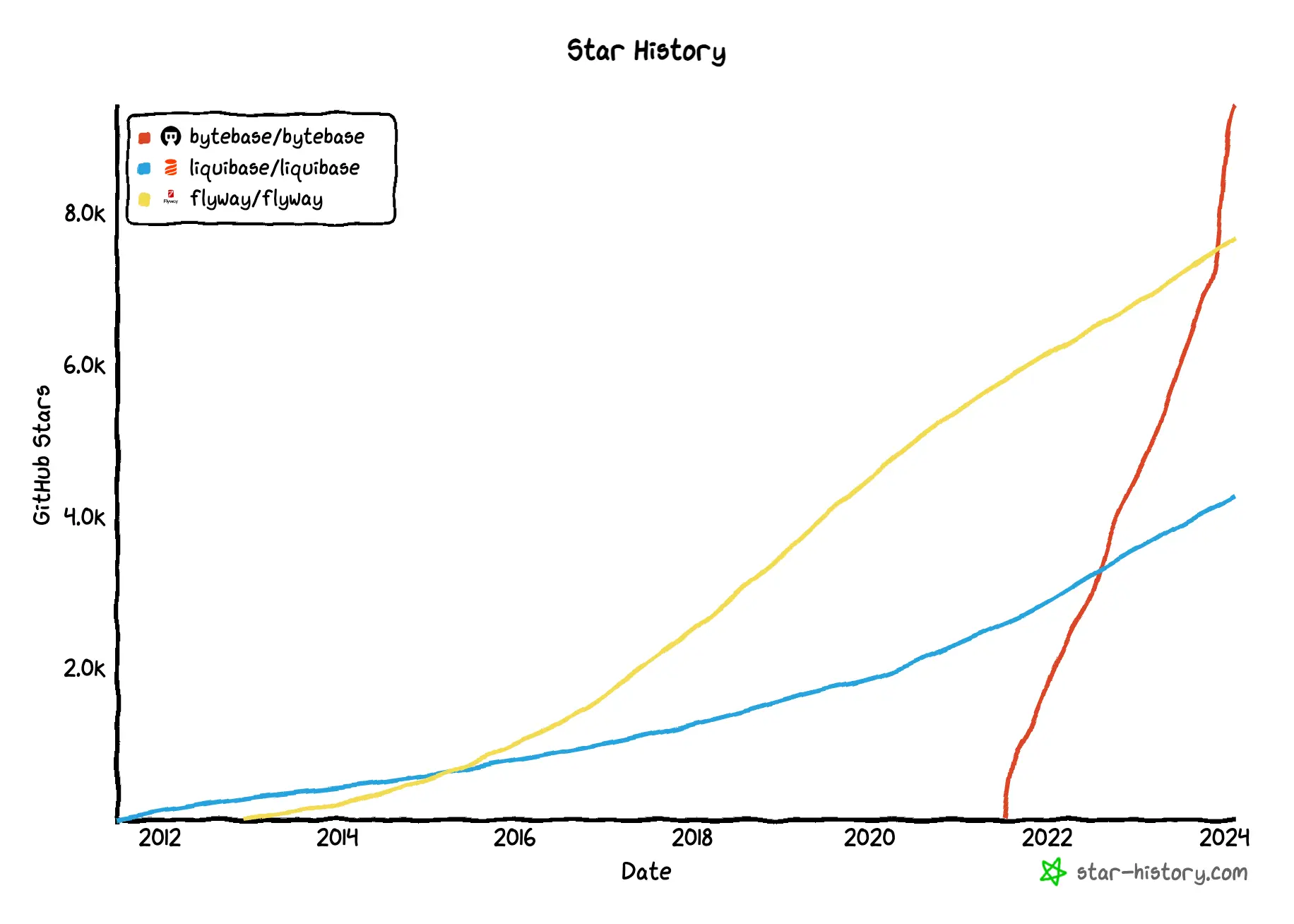
It's the only database change management solution acknowledged by CNCF, with growing adoption over the incumbents:
FAQ
Is DCM the same as schema migration?
No. Schema migration is one part of DCM — specifically the DDL part. DCM also covers DML (data changes), DCL (permissions), review workflow, audit, and access control. A migration tool like Flyway or Liquibase handles schema migration. A DCM platform handles the full lifecycle.
Do I need DCM if my team is small?
If one person writes and deploys every database change and no compliance auditor is asking questions, probably not. The moment a second person can change production — or the moment you need an audit trail — you need DCM. Starting early is cheaper than retrofitting.
Is DCM just "database DevOps"?
Overlapping but not identical. Database DevOps is the broader cultural and tooling shift toward treating databases like code. DCM is the specific discipline inside that shift focused on proposing, reviewing, deploying, and auditing changes. DCM is the "change review + approval + rollout + audit" slice of database DevOps.
Can I do DCM with just Git and CI?
To a degree — you can store SQL files in Git, have them reviewed in PRs, and run a migration tool on deploy. That gets you to Level 2–3 in the automation ladder. What Git + CI can't give you: engine-specific SQL review, runtime access control, data masking on query results, dynamic data access requests, or an audit trail that covers direct database connections (not just CI-driven changes).
What's the difference between state-based and change-based?
Change-based: you write the migration SQL (ordered files). State-based: you declare the desired schema and the tool generates the migration. State-based is cleaner for schema work; change-based is necessary for data migrations. Most teams use both. See State-based vs. Change-based.
Does DCM cover data changes or just schema?
Both. A mature DCM platform treats DML changes with the same review rigor as DDL — a DELETE FROM orders WHERE ... that runs against production is as consequential as a DROP COLUMN. Review, approval, audit, and rollback apply equally.
Further reading:
- Database Version Control
- Top Database Change Management Tools
- State-based vs. Change-based Database Version Control
- Database Version Control Best Practice
- Database Rollback
- How to Build a CI/CD Pipeline for Database Schema Migration
- The 6 Levels of Database Automation
- Database Multi-Environment Deployments
- How to Manage Database Access Control
- Database as Code